Understanding how many teraflops a gaming PC has can feel like deciphering ancient texts, especially when you're balancing a career, family, and a few precious hours for gaming each week. Teraflops, a measure of a graphics card's raw processing power, play a significant role in determining your PC's ability to render complex graphics, run high-fidelity games, and maintain smooth frame rates. This guide is crafted for the everyday gamer, not the tech guru, aiming to cut through the marketing hype and provide clear, actionable insights into what teraflops truly mean for your gaming experience. We'll explore why this metric matters, how it compares across different hardware, and crucially, how to get the best performance for your budget without overspending. Dive in to learn how to optimize your setup, understand real-world performance, and make informed upgrade decisions, ensuring your gaming time is always top-notch and stress-free.
What are Teraflops and Why Do They Matter for My Gaming PC?
Teraflops, or TFLOPS, measure a graphics card's raw computational speed, specifically one trillion floating-point operations per second. For your gaming PC, more TFLOPS generally means your GPU can render complex game worlds and maintain smoother frame rates more efficiently. They're a key indicator of a graphics card's potential to handle modern, graphically demanding games, especially at higher resolutions and settings, giving you a better visual experience.
How Many Teraflops Does a High-End Gaming PC Typically Have in 2026?
In 2026, a high-end gaming PC typically features a GPU with anywhere from 70 to over 120 TFLOPS. These powerful graphics cards are designed to deliver uncompromised 4K gaming, high refresh rates, and exceptional performance in virtual reality (VR) titles. However, the specific TFLOP count varies by manufacturer and model, with the very top-tier enthusiast cards pushing beyond even these impressive figures.
Do Console Teraflops Compare Directly to PC Teraflops for Gaming?
No, console and PC teraflops don't compare directly in a one-to-one manner. While consoles like the PlayStation 5 and Xbox Series X hover around 10-12 TFLOPS, they benefit from a highly optimized, closed ecosystem. This allows developers to extract more performance from seemingly lower raw TFLOP numbers compared to the varied hardware configurations of PC gaming. A PC often needs more raw TFLOPs to achieve similar or superior results due to its open and diverse nature.
What Role Does My CPU Play in Utilizing My Gaming PC's Teraflops?
Your CPU plays a critical supporting role in utilizing your gaming PC's teraflops. While the GPU performs the graphical calculations (measured in TFLOPS), the CPU is responsible for game logic, AI, physics, and preparing data for the GPU. If your CPU is too slow or bottlenecked, it can't feed the GPU data fast enough, causing the high-TFLOP GPU to sit idle, resulting in lower frame rates than its raw power suggests. A balanced system is key.
Is it Possible to 'Over-Teraflop' My Gaming PC for My Needs?
Yes, it is definitely possible to 'over-teraflop' your gaming PC, meaning you invest in a GPU with more TFLOPS than your actual gaming habits or other system components can realistically utilize. For instance, if you only play older esports titles at 1080p, a 100+ TFLOP GPU is overkill. This leads to wasted money that could have been better spent on a faster CPU, more RAM, or higher-quality peripherals for a more balanced and enjoyable overall experience.
How Can I Know if My Gaming PC's Teraflops Are Sufficient for New Games?
To determine if your gaming PC's teraflops are sufficient for new games, first identify your GPU's TFLOP count by checking its official specifications. Then, compare this to the recommended system requirements for the specific games you want to play. Also, consult recent benchmarks and performance reviews for your GPU model running those games. Remember to consider your desired resolution and settings, as higher demands will require more TFLOPs.
Beyond Teraflops, What Else Should I Prioritize for Gaming PC Performance?
Beyond teraflops, prioritize a balanced system. This includes a capable CPU that won't bottleneck your GPU, at least 16GB of fast RAM, and an NVMe SSD for quick loading times. Good cooling is also vital to prevent thermal throttling. Finally, regular driver updates and in-game setting optimizations are crucial to translate your hardware's raw power into smooth, enjoyable real-world gaming performance, ensuring value for your hard-earned money and time.
Hey fellow gamers! Ever found yourself staring at PC specs, seeing a number followed by 'TFLOPS,' and wondering, 'What even is that, and how many of them do I actually need?' You're not alone. For many of us who balance gaming with jobs, families, and everyday life, understanding the nitty-gritty of hardware can feel like another chore. We just want to dive into our favorite games, unwind, maybe connect with friends, and know our PC can handle it without a hitch. The good news? You don't need a computer science degree to get smart about your gaming rig. This guide is here to demystify 'teraflops' and help you make informed decisions, ensuring your precious gaming time is smooth, fun, and free from frustrating performance issues.
We know that for US gamers, gaming isn't just a hobby; it's a vital part of relaxation and social connection. With 87% of US gamers playing regularly, and many averaging over 10 hours a week, getting the most out of your hardware matters. But it's also about value for money and staying current without falling for every marketing gimmick. Let's cut through the noise and figure out what teraflops mean for your gaming PC, helping you build a setup that fits your life and your budget.
What Exactly Are Teraflops in Gaming?
At its core, a teraflop (TFLOP) is a unit of measurement for a computer's processing speed, specifically referring to one trillion floating-point operations per second. In the context of gaming PCs, this metric primarily applies to your graphics processing unit (GPU). Think of it as how many calculations your graphics card can perform every second. These calculations are essential for rendering complex 3D environments, detailed character models, realistic lighting, and intricate physics within games.
A higher teraflop count generally indicates a more powerful GPU capable of processing more data simultaneously, leading to better graphical fidelity and smoother frame rates. However, it's a measure of raw computational power, not necessarily a direct indicator of real-world gaming performance, as other factors come into play. It's like knowing a car's horsepower; it tells you about its engine's potential, but not how it handles on the road.
Why Do Teraflops Matter for a Gaming PC?
Teraflops matter because they provide a quick, albeit simplified, snapshot of a GPU's theoretical capability. For demanding modern games, especially those running at high resolutions like 1440p or 4K, or with intensive ray tracing effects, a GPU with a higher teraflop count can handle the workload more efficiently. This translates to a more visually stunning and fluid gaming experience, reducing stuttering and improving responsiveness.
For gamers balancing life and play, ensuring your PC can run the latest titles without constant tweaking or upgrades is crucial. A GPU with adequate teraflops means you can often 'set it and forget it' for a while, enjoying your games instead of troubleshooting. This becomes even more relevant with the current trend of graphically intensive AAA titles and the rise of social gaming experiences where smooth performance is key to a shared good time.
How Many Teraflops Does a Modern Gaming PC Have?
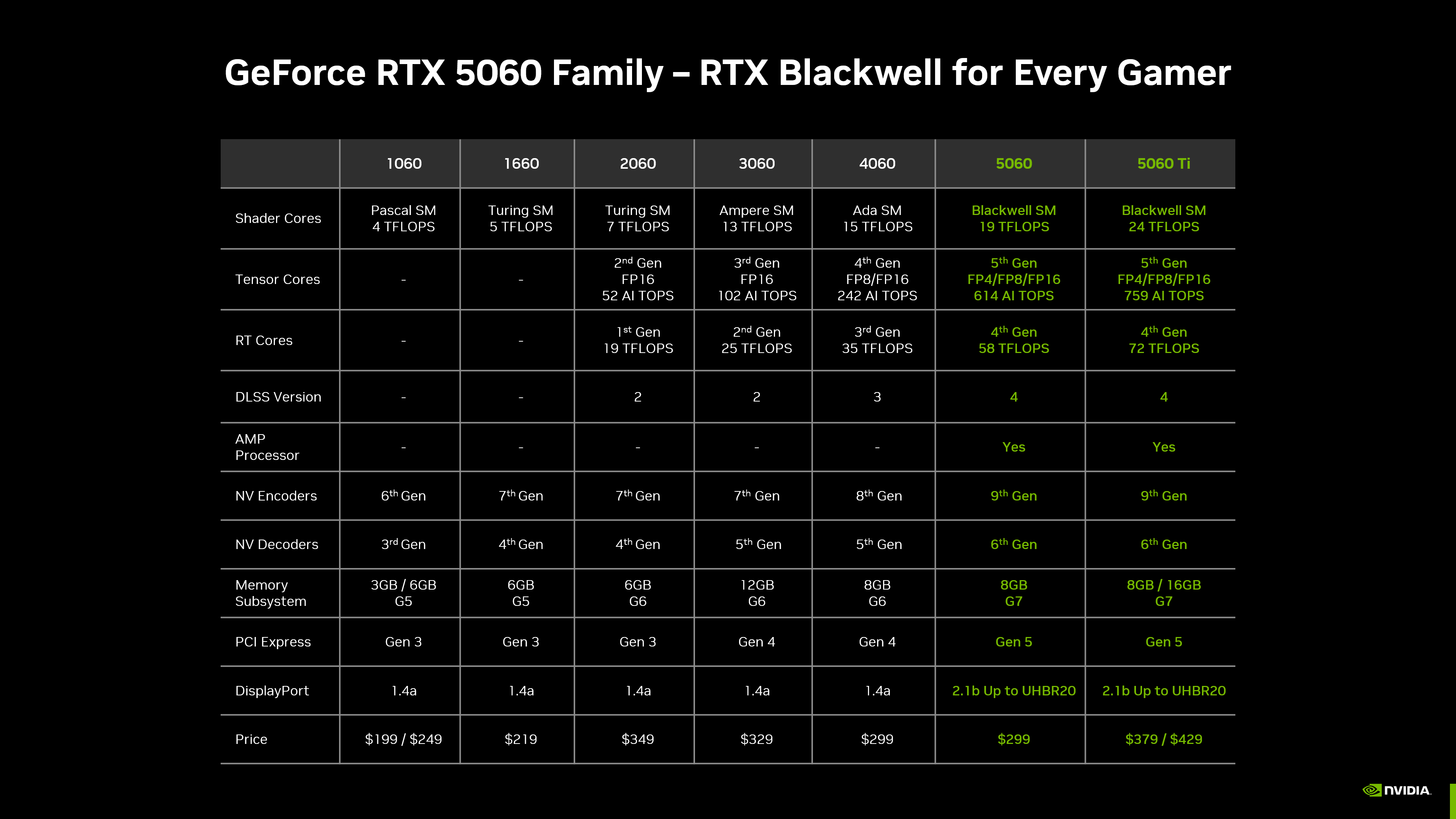
The teraflop count in a modern gaming PC varies significantly based on the GPU model and price point. Entry-level gaming PCs in late 2025/early 2026 might feature GPUs in the 5-15 TFLOP range, suitable for 1080p gaming at decent settings. Mid-range systems often boast GPUs with 20-40 TFLOPs, offering excellent 1440p performance and even some entry-level 4K capabilities.
High-end gaming PCs, designed for uncompromised 4K gaming, high refresh rates, and VR, can push well over 50 TFLOPs, with top-tier GPUs sometimes exceeding 100 TFLOPs. For example, a popular high-end GPU released this month might offer around 80-90 TFLOPs, while its enthusiast-level counterpart could reach over 120 TFLOPs. This wide range means there's a TFLOP sweet spot for every budget and performance expectation.
Are Teraflops the Only Factor for PC Gaming Performance?
Absolutely not! While teraflops are a key metric for a GPU's raw power, they are far from the only factor determining your gaming PC's overall performance. Think of your PC as a team: the GPU is the star player, but it needs a strong supporting cast to truly shine. Here are other critical components that significantly impact your gaming experience:
- CPU (Central Processing Unit): A powerful CPU ensures your games run smoothly, handling game logic, AI, and physics calculations. A bottlenecked CPU can limit even the most powerful GPU.
- RAM (Random Access Memory): Sufficient and fast RAM (16GB or 32GB is common for modern gaming) allows your system to load game assets quickly and manage multiple tasks without slowdowns.
- Storage (SSD vs. HDD): A Solid State Drive (SSD), especially NVMe SSDs, drastically reduces game loading times and improves overall system responsiveness compared to traditional Hard Disk Drives (HDDs).
- Cooling: Effective cooling prevents thermal throttling, ensuring your CPU and GPU can maintain their peak performance without overheating.
- Software Optimization: Game developers optimize titles for specific hardware, and drivers from GPU manufacturers (NVIDIA, AMD) play a huge role in translating raw TFLOP power into in-game performance. DirectX or Vulkan versions also matter.
- Game Engine & Optimization: Some games are simply better optimized than others, meaning they can run well on lower-TFLOP GPUs.
Focusing solely on teraflops is a common pitfall. A balanced system, where all components work harmoniously, will almost always outperform a PC with an overpowered GPU and weak supporting parts.
How Do PC Teraflops Compare to Gaming Consoles?
Comparing PC teraflops directly to consoles like the PlayStation 5 or Xbox Series X is a bit like comparing apples and oranges, but it offers a useful perspective. The PS5 and Xbox Series X typically boast GPUs in the 10-12 TFLOP range. On paper, many mid-range PC GPUs easily surpass these numbers.
However, consoles benefit from a highly optimized, closed ecosystem. Developers can fine-tune games specifically for that exact hardware, leading to remarkable performance even with seemingly lower TFLOP counts. PCs, on the other hand, have to account for an infinite combination of hardware and software, requiring more raw power to achieve similar results. While consoles offer great value for money and a 'plug-and-play' experience, a high-end gaming PC will almost always offer superior graphical fidelity, higher frame rates, and more flexibility (like modding, wider game libraries, and productivity tasks) if you're willing to invest. This flexibility is particularly appealing to the 60% of US gamers who also balance productivity with play.
What Teraflops Do I Need for 4K or VR Gaming?
If you're aiming for the pinnacle of visual fidelity with 4K gaming or want to dive into immersive virtual reality (VR) experiences, you'll definitely need a GPU with a higher teraflop count. For comfortable 4K gaming at 60 frames per second (FPS) with high to ultra settings in most modern AAA titles, you're looking at GPUs in the 40-70 TFLOP range at a minimum. For demanding titles or higher refresh rates at 4K, GPUs exceeding 70-100 TFLOPs are often preferred.
VR gaming also demands significant horsepower due to rendering two separate images (one for each eye) at high resolutions and frame rates to prevent motion sickness. A good VR experience typically requires a GPU with at least 30-50 TFLOPs for current-generation headsets, with next-gen VR pushing those requirements even higher. Always check the recommended specs for the specific VR headset and games you plan to play, but generally, the more teraflops, the smoother and more enjoyable your 4K or VR journey will be.
How Can I Maximize My Gaming PC Performance Without Chasing Teraflops?
You don't always need to buy a new GPU to boost your gaming experience. For busy gamers on a budget, optimizing your existing setup can make a huge difference. Here's how:
- Update Drivers Regularly: GPU manufacturers frequently release driver updates that include performance optimizations for new games. This is often the quickest and easiest performance boost.
- Optimize In-Game Settings: Experiment with game settings. Lowering demanding options like shadows, anti-aliasing, or texture quality can significantly improve FPS without a major visual downgrade. Many games now offer optimization guides or auto-detect settings.
- Ensure Adequate Cooling: Keep your PC clean from dust. Good airflow and healthy temperatures prevent your components from throttling down their performance.
- Upgrade RAM: If you have less than 16GB, upgrading to 16GB or even 32GB of faster RAM can alleviate bottlenecks, especially if you multitask or play open-world games.
- Switch to an SSD: If your games are on an HDD, moving them to an SSD will dramatically cut loading times and improve overall responsiveness.
- Close Background Applications: Discord, web browsers, and other apps consume resources. Close anything you don't need while gaming.
- Overclock Safely: For advanced users, a mild and stable overclock of your CPU or GPU can yield a small performance bump, but research thoroughly and proceed with caution.
These tips are particularly valuable for gamers who need to balance gaming with other life commitments, providing solutions to common performance problems without a hefty financial investment. Many US gamers are finding joy in social and cozy games, which often aren't as graphically demanding, making optimization even more effective than chasing raw power.
Is Upgrading My GPU for More Teraflops Worth It on a Budget?
Upgrading your GPU can be the single most impactful upgrade for gaming performance, but 'worth it' depends entirely on your current setup, budget, and gaming goals. If your current GPU is several generations old and is clearly bottlenecking your system, a new GPU with significantly more teraflops will offer a substantial improvement.
However, if your CPU, RAM, or storage are also old, simply dropping in a high-TFLOP GPU might create new bottlenecks. A general rule of thumb: check if your CPU is at 100% usage while gaming and your GPU is not. If so, your CPU is likely the bottleneck. For budget-conscious gamers, consider buying previous-generation GPUs on sale or looking at used markets for good value. Always research benchmarks for the specific games you play with the GPU you're considering. Sometimes a slightly less powerful GPU paired with faster RAM or an NVMe SSD can provide a more balanced and enjoyable experience for the same money.
What are the Best Practices for Maintaining Gaming PC Performance?
Maintaining your gaming PC is key to consistent, frustration-free performance, extending the life of your components, and ensuring your gaming sessions are always top-tier. Here's a rundown of best practices:
- Keep Software Updated: Regularly update your operating system, GPU drivers, and game launchers. These updates often include performance improvements, bug fixes, and security patches.
- Monitor Temperatures: Use monitoring software (like MSI Afterburner or HWMonitor) to keep an eye on your CPU and GPU temperatures, especially during gaming. High temps lead to thermal throttling and reduced performance.
- Clean Inside Your PC: Dust is the enemy of electronics. Use compressed air to clean out dust from fans, heatsinks, and vents every few months. This improves airflow and cooling efficiency.
- Manage Background Processes: Before gaming, close unnecessary applications running in the background. Use Task Manager to identify and close resource-intensive programs.
- Optimize Storage: Ensure you have enough free space on your gaming drive (at least 15-20%). While defragmentation isn't necessary for SSDs, regularly cleaning up old files and uninstalling unused games can help.
- Antivirus and Malware Scans: Run regular scans to keep your system free from malicious software that can hog resources and degrade performance.
- Power Settings: Set your PC's power plan to 'High Performance' (or equivalent in Windows 11/10) to ensure your hardware isn't artificially limited during gaming.
By following these steps, you'll spend less time troubleshooting and more time enjoying those valuable moments of relaxation, skill-building, or social play that gaming offers.
Can Mobile Gaming Impact PC Teraflop Needs?
Yes, mobile gaming trends can subtly influence PC teraflop needs, primarily by shifting overall gaming interest and development focus. The current dominance of mobile gaming (which often involves casual, social, or free-to-play titles) means that a significant portion of the gaming audience isn't chasing ultra-high fidelity graphics on PC. This can sometimes lead to PC game developers optimizing more broadly, rather than solely for the absolute bleeding edge, making moderately powerful PCs more capable of running a wider range of titles comfortably.
However, the rise of mobile also pushes innovation in cloud gaming and cross-play, which can indirectly put pressure on PC hardware. If more games offer seamless cross-platform experiences, PC gamers might want their rigs to perform on par or better than consoles, justifying a certain TFLOP threshold. Ultimately, while mobile gaming expands the market, it also creates new expectations for accessibility and performance, meaning that a well-optimized PC with sensible TFLOPs will continue to be a sweet spot for those balancing life and high-quality gaming.
What About Future-Proofing My PC with Teraflops?
Future-proofing a PC, especially when it comes to raw processing power like teraflops, is a tricky business. Technology evolves so rapidly that what's cutting-edge today might be mid-range in two years. Instead of trying to 'future-proof' for a decade, which is often uneconomical, aim for 'current-proofing' your PC. This means investing in hardware that comfortably meets today's and the next 1-2 years' gaming demands for your desired resolution and settings. Look for a GPU with a TFLOP count that is slightly above the recommended specs for the games you currently play or plan to play soon. This approach offers a better balance of performance and value, avoiding overspending on theoretical future needs. Regular, smaller upgrades or optimizing your existing system generally makes more financial sense than one massive 'future-proof' build.
Are Higher Teraflops Always Better for Gaming?
While a higher teraflop count generally indicates more raw GPU power, it's not always 'better' in a practical sense, especially if other components create a bottleneck or if the game isn't optimized to fully utilize that power. For instance, a GPU with extremely high teraflops might be underutilized if paired with a slow CPU or insufficient RAM. Game optimization and driver efficiency also play a massive role. Sometimes a GPU with slightly fewer teraflops but better architecture (e.g., more efficient memory, better cooling, superior driver support) can outperform a higher-TFLOP card from a different generation or manufacturer. It's crucial to look at real-world benchmarks and reviews for specific games rather than relying solely on the TFLOP number.
How Do I Check My PC's Teraflops?
Checking your PC's exact teraflops isn't as straightforward as looking it up in Device Manager, as Windows doesn't display it directly. Teraflops are a calculated theoretical peak performance number provided by the GPU manufacturer. To find your GPU's teraflop count, you'll typically need to:
- Identify your specific GPU model (e.g., NVIDIA GeForce RTX 4070, AMD Radeon RX 7800 XT). You can find this in Device Manager under 'Display adapters' or by using a tool like GPU-Z.
- Once you know your exact model, search online for its specifications. Reputable tech review sites or the manufacturer's official product pages will usually list the peak FP32 (single-precision floating-point) performance in TFLOPs.
Remember, this is a theoretical maximum and real-world performance will vary.
What is a Good Teraflop Number for 1080p Gaming?
For comfortable 1080p gaming at high settings and 60+ FPS in most modern titles, a GPU with anywhere from 10 to 20 TFLOPs is generally a good target. This range allows for smooth gameplay, even in some graphically intensive games. If you're aiming for higher refresh rates (120Hz or 144Hz) at 1080p, especially in esports titles or faster-paced games where every frame counts, you might want to consider the higher end of that range, or even stepping into the 20-30 TFLOP bracket for extra headroom. Always check specific game requirements, as optimization and your personal settings will influence performance.
Does RAM Speed Affect Teraflops' Impact?
While RAM speed doesn't directly change your GPU's teraflop count, it absolutely affects how effectively your GPU can utilize its processing power. Your CPU needs to feed data to the GPU, and if your RAM is slow, it can create a bottleneck, slowing down the CPU's ability to prepare data for the GPU. This means even a high-TFLOP GPU might be waiting for data, leading to lower actual frame rates than its raw power suggests. Faster RAM, especially when paired with compatible CPUs, ensures a smoother data flow throughout your system, allowing your high-TFLOP GPU to work closer to its full potential.
Can a High Teraflop PC Still Perform Poorly?
Yes, absolutely. A gaming PC with a high teraflop GPU can still perform poorly if other components are not up to par or if there are software-related issues. For example:
- CPU Bottleneck: A powerful GPU paired with an old or weak CPU will lead to the CPU struggling to keep up, limiting the GPU's potential.
- Insufficient RAM: Not enough RAM, or very slow RAM, can cause stuttering and poor loading times, regardless of GPU power.
- Slow Storage: Running games off an old HDD will result in long loading screens and in-game stutters as assets struggle to load.
- Poor Cooling: Overheating components will throttle their performance to prevent damage.
- Outdated Drivers or OS: Software issues, including old drivers or an unoptimized operating system, can severely impact performance.
- Game Optimization: Some games are poorly optimized themselves and may run poorly even on high-end hardware.
It's always about the overall system balance, not just one impressive number.
Phew! That was a lot, but hopefully, you now feel more confident when you hear the term 'teraflops' and understand what it means for your gaming PC. The key takeaway is that while teraflops are a good indicator of raw GPU power, they're just one piece of the puzzle. A truly great gaming experience comes from a balanced system, smart optimization, and understanding your personal gaming needs and budget.
Remember, the goal isn't just to chase the biggest numbers, but to ensure your PC delivers the fun, relaxation, and social connection you seek in your gaming time. Don't let specs stress you out! Focus on getting solid value for money, keeping your rig clean, and updating those drivers. What's your biggest gaming challenge when it comes to performance or hardware upgrades? Comment below!
FAQ Section
What does TFLOPs mean for PC gaming?
TFLOPs (teraflops) measure a graphics card's raw processing power, indicating how many trillion floating-point operations it can perform per second. For PC gaming, higher TFLOPs generally mean better capability to render complex graphics and maintain smoother frame rates, especially in demanding games or at higher resolutions.
Is 10 TFLOPS good for a gaming PC?
10 TFLOPs is a solid baseline for entry to mid-range gaming in 2026. It's generally good for smooth 1080p gaming at high settings in many modern titles and can even handle some 1440p gaming with optimized settings. For 4K or very high refresh rates, you would typically need a GPU with a higher TFLOP count.
How important are teraflops compared to GPU memory?
Both teraflops and GPU memory (VRAM) are crucial. Teraflops dictate how fast the GPU can process data, while VRAM dictates how much data (textures, models, etc.) it can store and access quickly. A GPU with high teraflops but insufficient VRAM can be bottlenecked when playing games with high-resolution textures, especially at 4K. A balanced approach with adequate TFLOPs and VRAM is essential for optimal performance.
Do games primarily use CPU or GPU teraflops?
Games primarily rely on GPU teraflops for graphics rendering. While CPUs also have floating-point capabilities, the vast majority of 'teraflops' discussions in gaming refer to the GPU's power. The CPU handles game logic, AI, and physics, but the heavy lifting for visual output, where TFLOPs are critical, falls to the GPU.
Can I improve my PC's teraflops without buying a new GPU?
You cannot directly increase your GPU's theoretical teraflop count without hardware replacement. However, you can make your existing GPU *perform* more efficiently, effectively maximizing the utilization of its inherent TFLOPs. This involves updating drivers, optimizing in-game settings, ensuring proper cooling, and having a balanced system (fast CPU, sufficient RAM, SSD storage) that doesn't bottleneck the GPU.
Is a higher teraflop count better for streaming games?
While a higher teraflop count provides more overhead for graphically demanding games, it's not the primary factor for streaming performance itself. Streaming relies heavily on your CPU for encoding (unless you use your GPU's dedicated encoder like NVENC or AMD's VCN), and your internet upload speed. A powerful GPU means you can run the game smoothly, freeing up resources for the streaming software, but the streaming component requires a strong CPU and network connection more directly.
Teraflops measure GPU raw processing power, crucial for gaming but not the sole performance indicator. A modern gaming PC typically ranges from 10 to over 100 TFLOPS depending on the GPU. Other factors like CPU, RAM, storage, and software optimization significantly influence real-world gaming performance. Understanding your specific gaming needs and budget is key to choosing the right TFLOP level without overspending. Focus on balancing components for a smooth, enjoyable experience rather than solely chasing high TFLOP numbers.
35


Best Gaming PC Builds For 2026 Best Gaming PC Builds For 2026.webp. RTX 5080 Benchmarks Real World FPS DLSS 4 Efficiency Results 250204 5080 F . What Does 1000 Actually Get You In The 2026 PC Market 1000 Dollar Gaming Pc Performance Tradeoffs 2026 . Building A Gaming PC In 2026 Is DIFFERENT YouTube . With Xbox Project Helix And DLSS 5 The Next Generation Of Gaming Is 2026 Is Going To Suck For Pc Gaming 5jbt.960



The Impressive Teraflops Of The Scorpio Uncovering The Gaming Console How Many Teraflops Does The Scorpio Have. The Gaming PC You Need To Build For 2026. Best Graphics Cards In 2026 I Ve Tested Pretty Much Every AMD And . I Made A TeraFLOPS Calculator Website R . The Best Gaming PC Of 2026 Top Prebuilt Desktops Gaming Pc


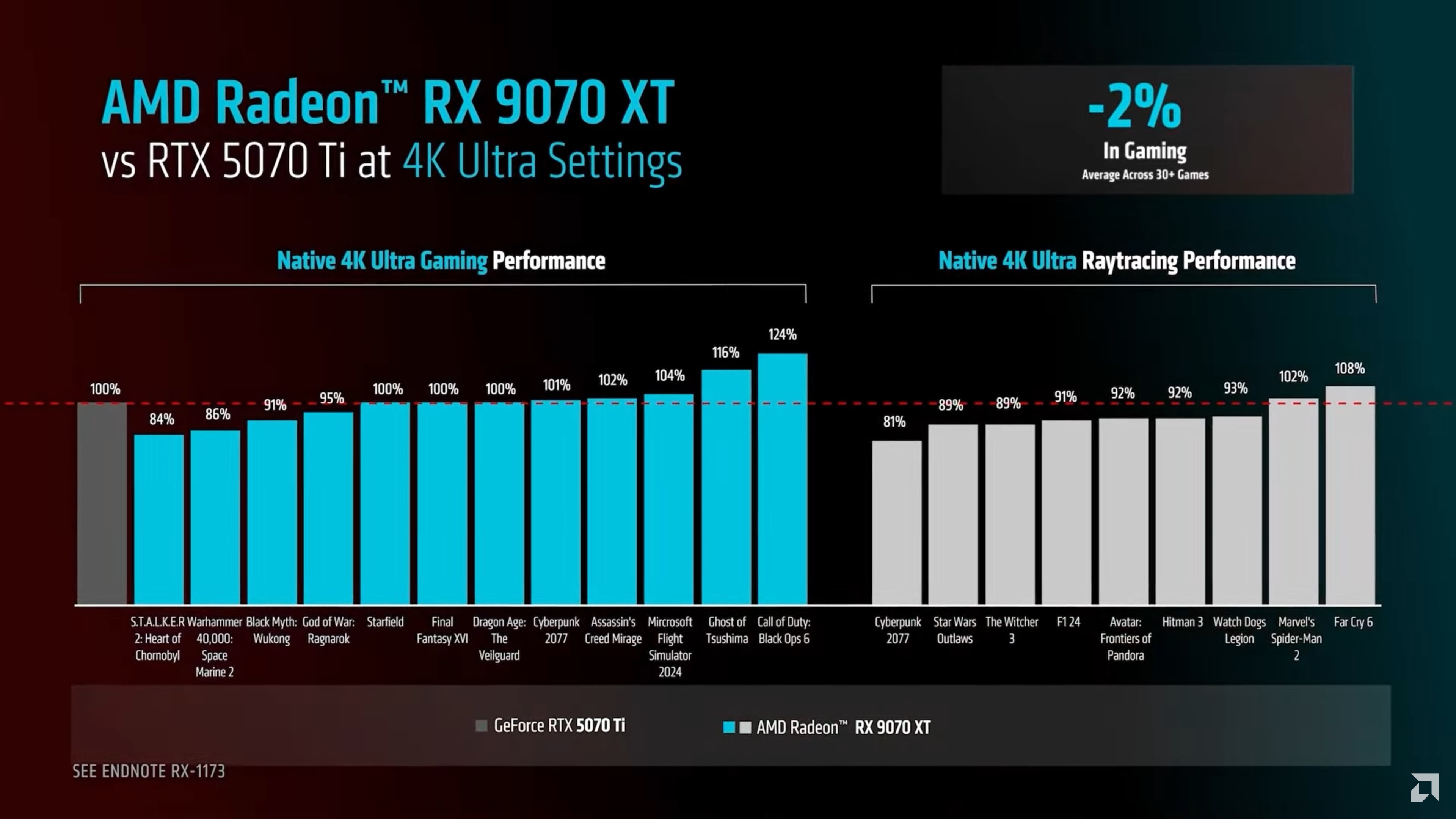
Should You Build A PC In 2026 Mid Range Gaming Build Guide January Cld Sample . IEEE E3 2016 Last Week Showed The World That The Future Of Gaming Is Media. How Many Flops Is My Computer Determine How Much Processing Power How Big Is A Teraflop . Best GPUs For Gaming In 2026 RTX 5000 Vs RX 9000 Vs Last Gen PC Gaming PC Build For 600 . AMD Has Revealed The Official Details Release Date And Prices For 9070XT Vs 5070Ti
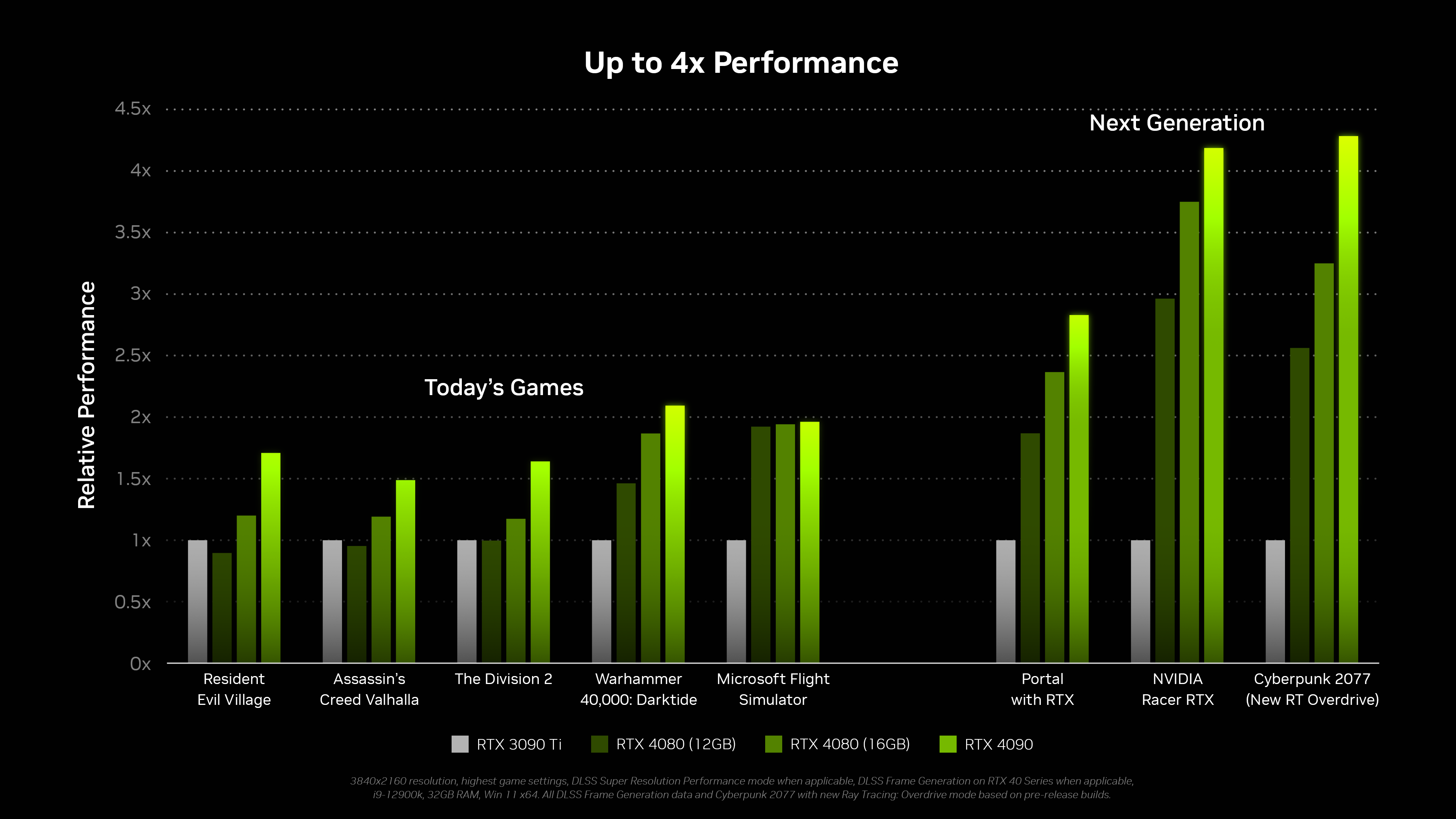

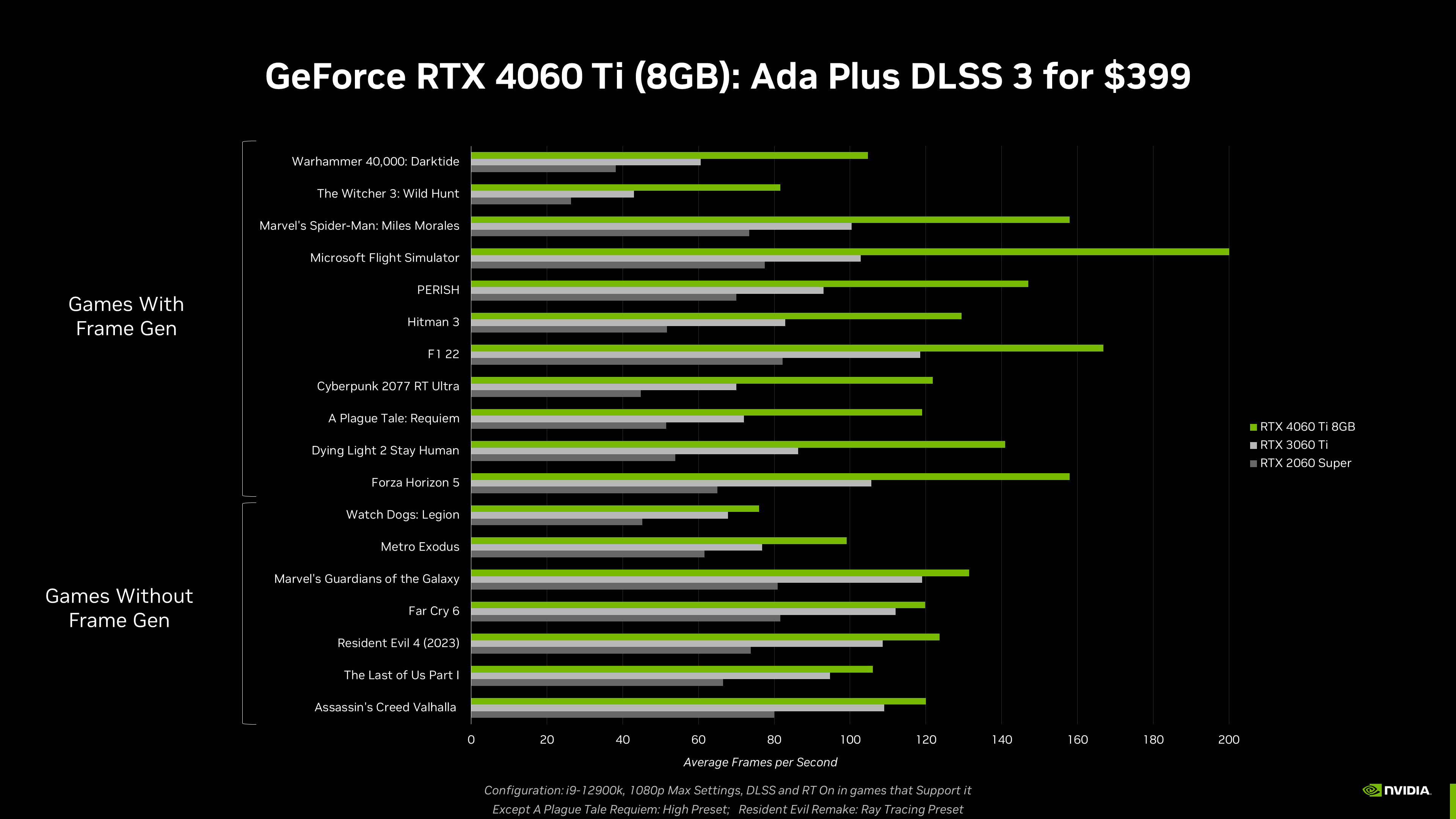
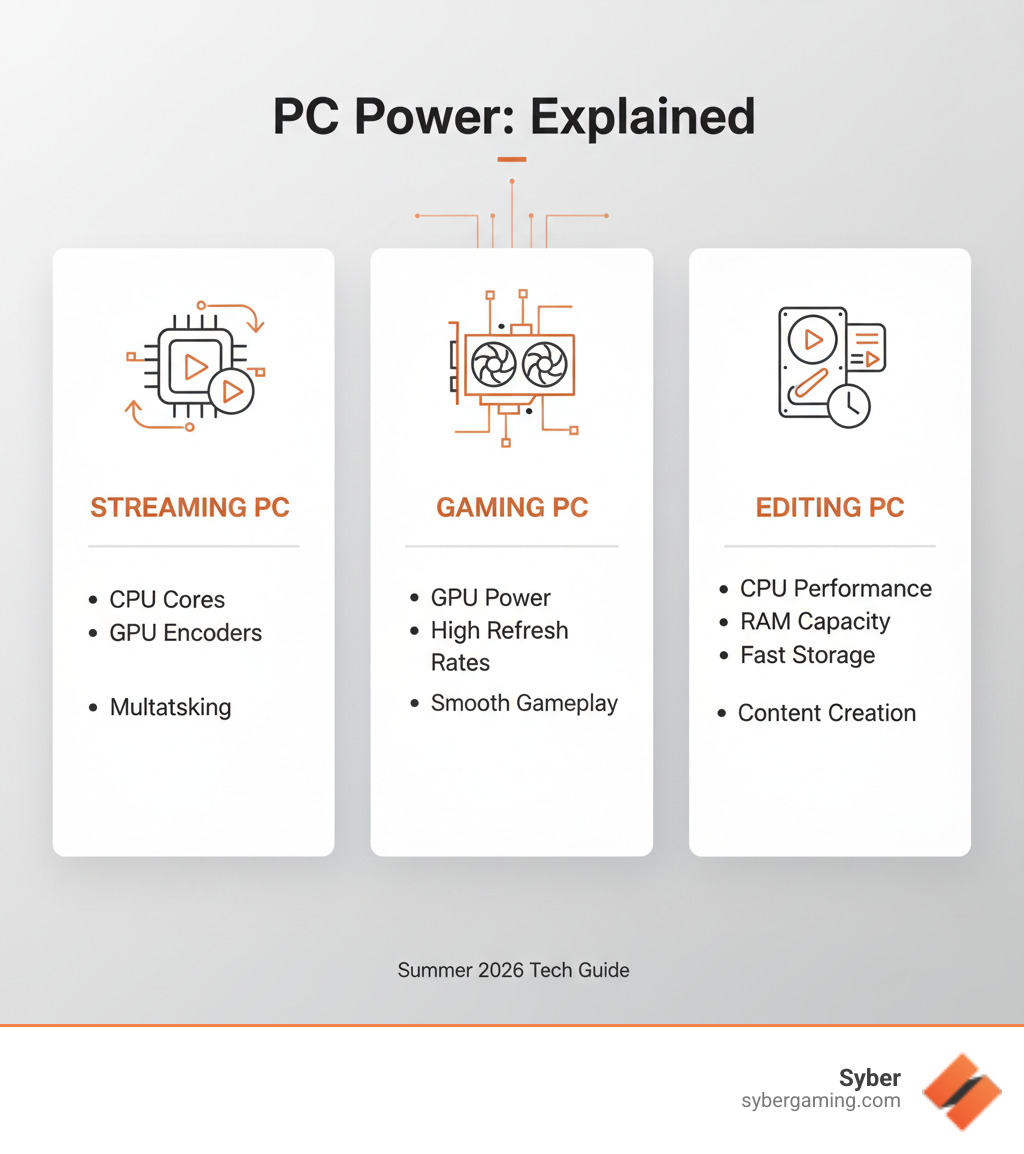
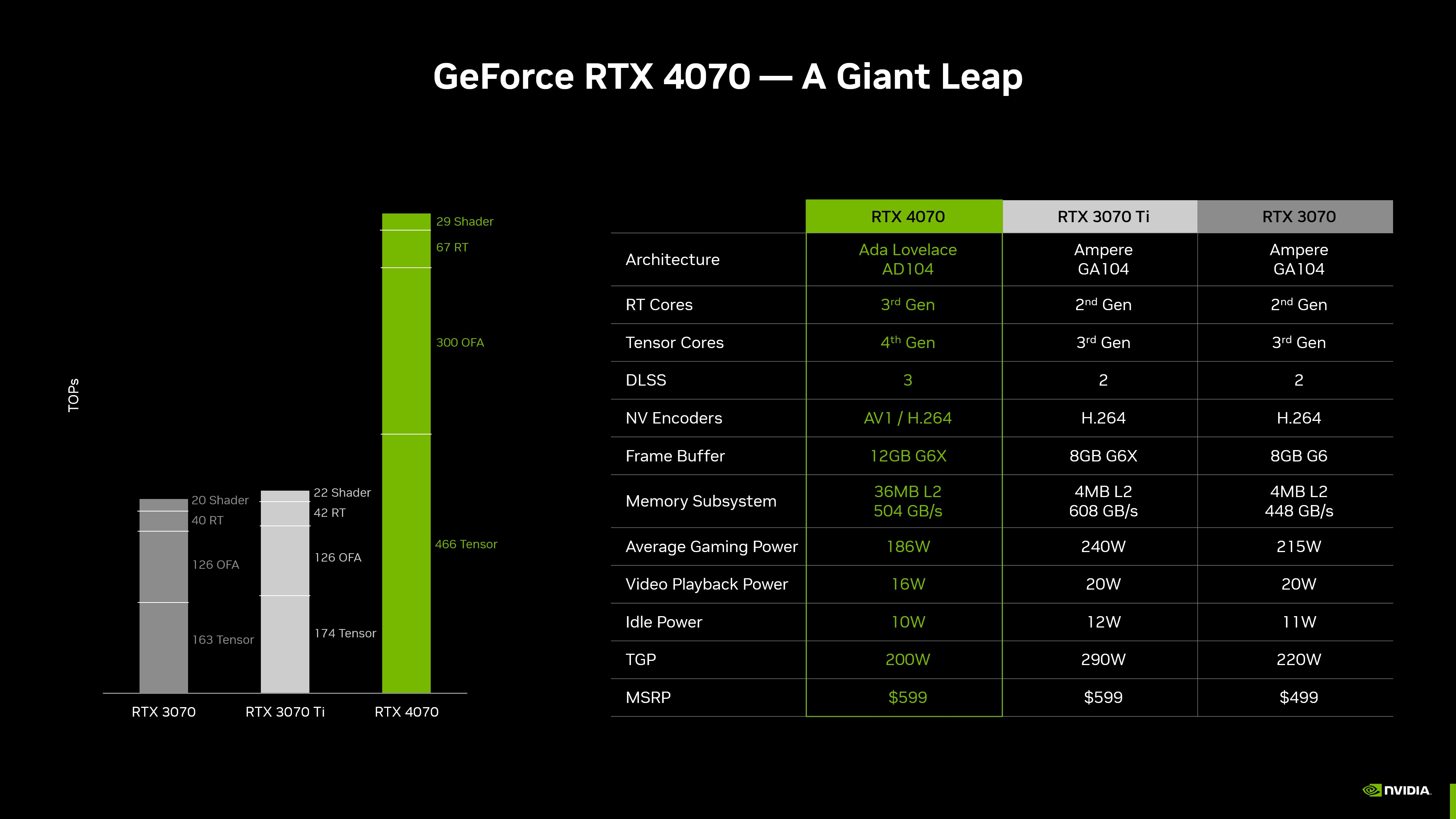
What S Your Opinion On The Prices Of New 4000 NVIDIA Series Cards Geforce Rtx 40 Series Gaming Performance . External Gpu Vs Internal Performance At William Deas Blog AMD ISSCC 2023 CPU GPU Performance Efficiency Trends Zettascale Computing Advanced Packaging 3 1456x817 . Nvidia Lance Les RTX 4060 Et 4060 Ti Est Il Temps De Passer La Nvidia Geforce Rtx 4060 Ti 8gb Performance . Summer 2026 PC Best Buy Guide Prebuilt Power For Streamers SoftBit . Geforce Rtx 4070 Rtx 4070 Giant Leap
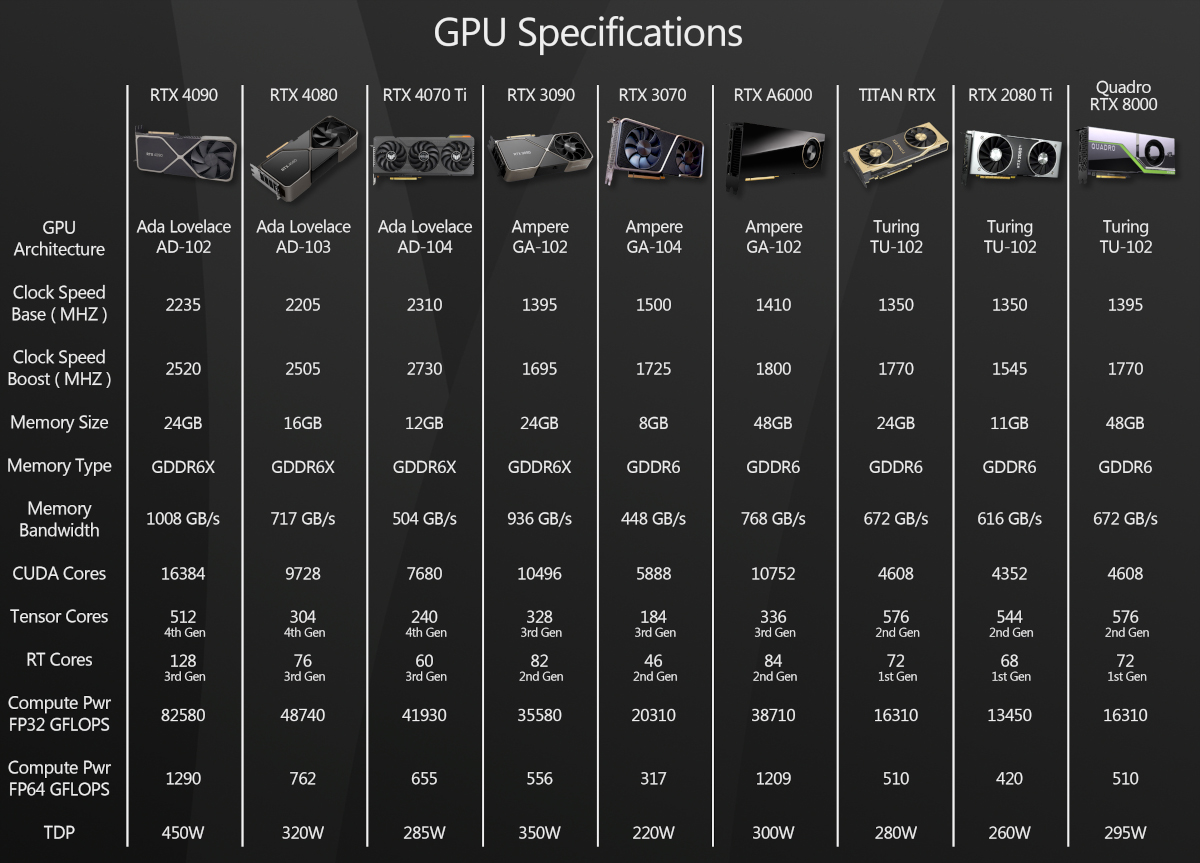

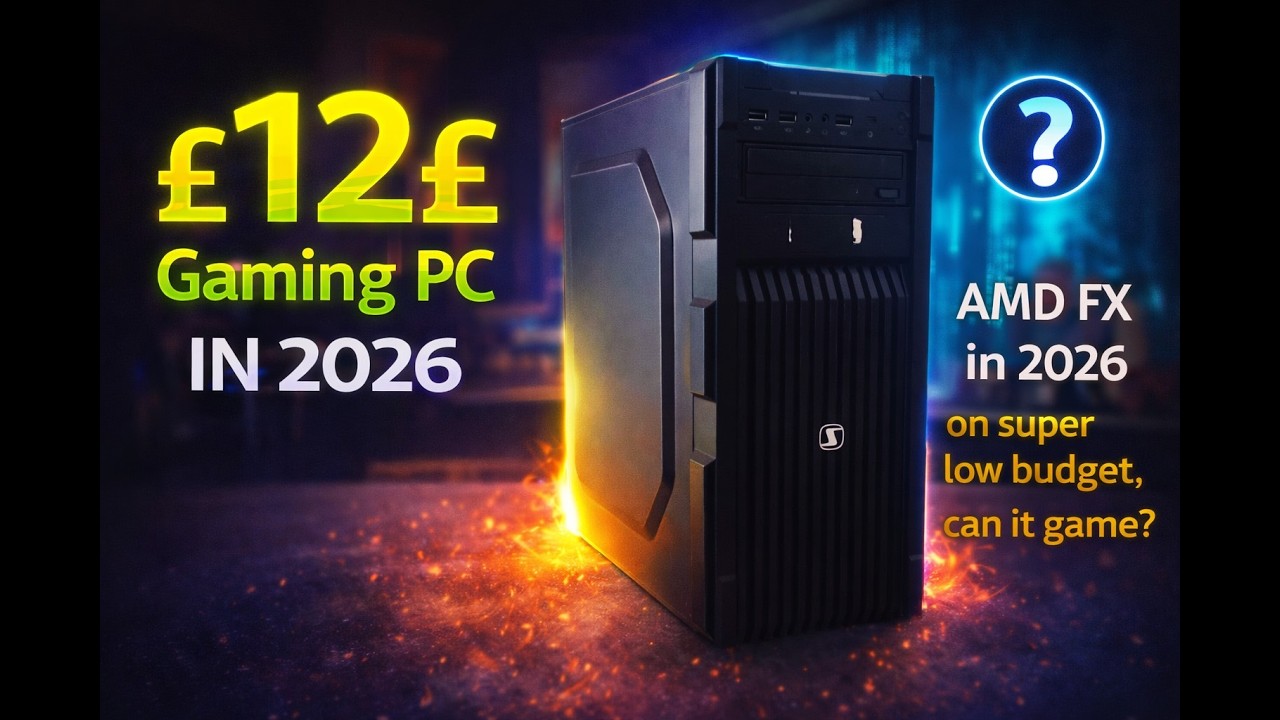


Psychonauts 2 Lotto Di 20 Foto Originali E Ristampe Storiche Mercedes 230609 SpecsChart Lg . 479 Cheap Bastard S Gaming PC Build Guide February 2024 GamersNexus 479 Cb Pc Build 00007 .webp. 12 AMD Gaming PC In 2026 Is It Any Good YouTube . RAM Reality Check How Much Memory Does Your PC Actually Need In 2026 2 . What Is A Reference Card Gpu Answered YLEAV 1 List Of NVIDIA GPUs In Each Lineup
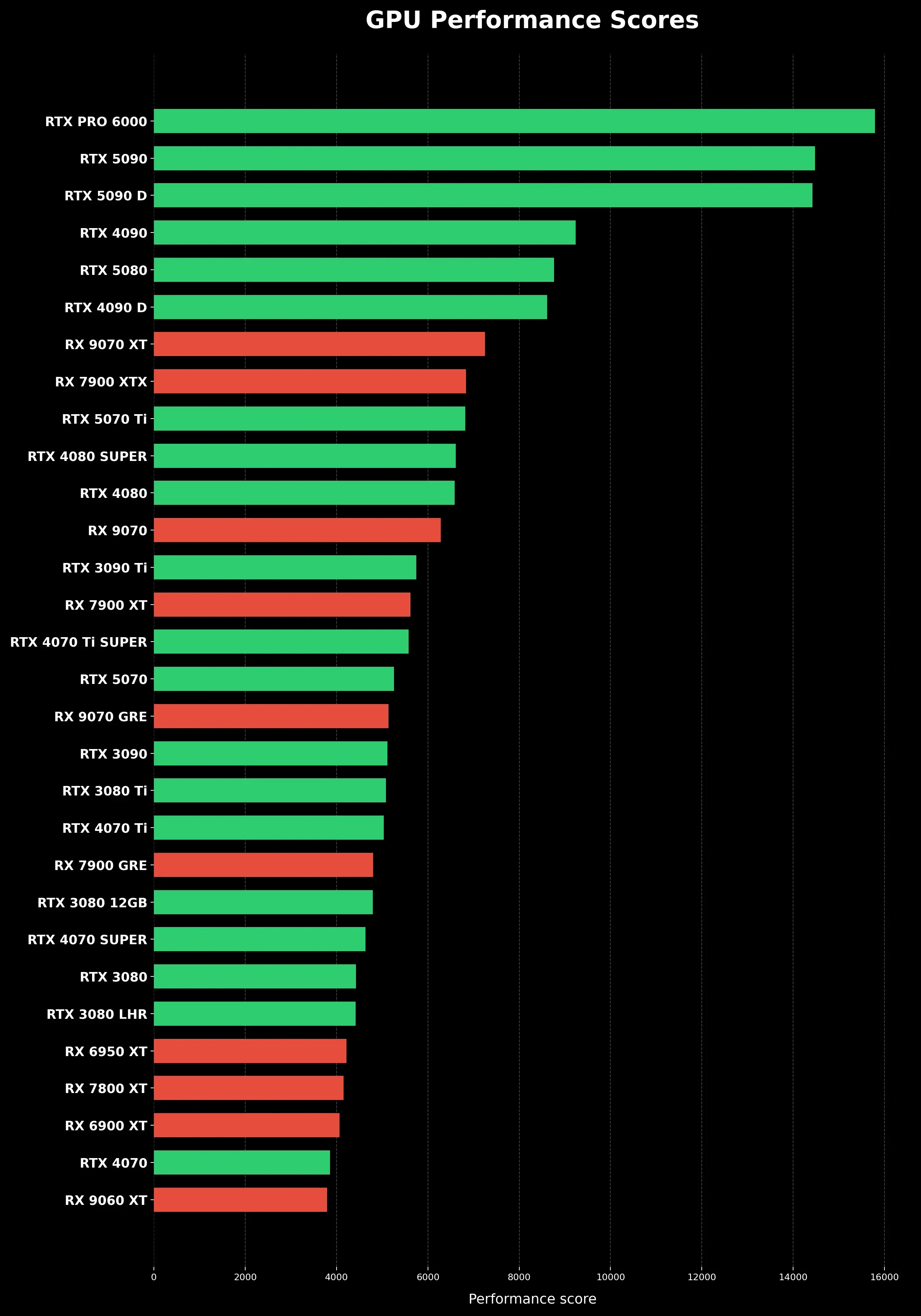

Best Graphics Card 2026 Comparison Ranking And Buying Guide For PC Gpu Performance Scores Clean Vertical. Can I Find Out How Many TeraFlops My PC Can Calculate DesktopEdge Can I Find Out How Many Teraflops My Pc Can Calculate 1622 1 . NVIDIA GeForce RTX 4070 Consumes The Same Power As An RTX 3060 But As NVIDIA GForce RTX 4070 Graphics Card Leak . Announcing The GeForce RTX 5060 Desktop Family DLSS 4 Multi Frame Geforce Rtx 5060 Desktop Family Comparison . Valve Enters Console Market Again With Steam Machine A New PC Console Steam Machine



PC Gamers Have Until March 18 To Score A Free Steam Key For A Popular One Of Tony Revolori S Dream Roles Is To Voice Someone In Kingdom Hearts 1 . ASRock RX 9060 XT Challenger OC 16GB LanOC Reviews Graph05 . How Much CPU GHz Do You Need For Gaming In 2026 Image 3 1536x963 . Update How Many FLOPS Are In Game Consoles TGDaily Chart3 . Computer Flops Calculating How Many Tech With Tech Graphics Processing Unit Neon Light 1536x903