A comprehensive guide on how to compare CPUs for gaming for the busy adult gamer in 2026. This article cuts through the jargon, helping you understand crucial metrics like core counts, clock speeds, and cache. Discover how to identify the best value processor that balances your gaming ambitions with your budget and limited time, ensuring smooth gameplay for popular titles and social experiences. Learn about the latest Intel and AMD advancements, performance benchmarks, and real-world gaming scenarios without getting bogged down in hype. Optimize your hardware upgrade decisions to enjoy your favorite games, unwind with friends, and even build new skills, all while effectively managing life's demands. This resource offers practical, actionable advice for maximizing your gaming PC's potential, making your next upgrade decision clearer and more confident. Get ready to game smarter not harder.
Q: How much CPU do I really need for 1440p gaming?
A: For optimal 1440p gaming in 2026, you'll generally want a CPU with at least 6 to 8 strong cores and a boost clock speed of 4.5 GHz or higher. This ensures your processor can keep up with the demands of modern games and prevent bottlenecking even a powerful GPU at that resolution. While GPU is paramount for 1440p, a capable CPU like a Ryzen 7 7800X3D or Intel Core i7-14700K provides excellent frame stability and smoother gameplay.
Q: Is a higher core count always better for gaming?
A: Not always. While modern games are utilizing more cores, there's a point of diminishing returns. For pure gaming, a CPU with 6-8 strong, fast cores is often sufficient. Going beyond that, say 12 or 16 cores, offers little additional performance in most games, with the exception of specific titles or if you're heavily multitasking, streaming, or doing content creation simultaneously. High single-core performance remains crucial for gaming.
Q: When should I consider upgrading my CPU instead of my GPU?
A: You should prioritize a CPU upgrade if you notice your GPU utilization is consistently low (e.g., below 90%) while your CPU utilization is very high (near 100%) during gaming, especially at lower resolutions. This indicates a CPU bottleneck. Other signs include frequent stutters, slow loading times, or poor performance in CPU-intensive games like strategy titles or open-world sandboxes, even if your GPU is relatively new.
Q: Can my old motherboard handle a new gaming CPU?
A: Typically, no. Motherboards are designed for specific CPU sockets (e.g., Intel LGA1700 or AMD AM5). A new generation CPU often requires a new motherboard with a compatible socket and chipset to support its features and power delivery. Always check your desired CPU's socket type and compare it with your motherboard's specifications. Sometimes, a BIOS update might allow an older motherboard to support newer CPUs within the *same* socket generation.
Q: What are the signs my current CPU is bottlenecking my gaming performance?
A: Key signs of a CPU bottleneck include your GPU utilization being significantly lower than 99% during gameplay, even when you're not capping frame rates. Your CPU will likely be near 100% utilization. You'll also experience inconsistent frame times, noticeable stutters, and lower-than-expected average FPS compared to benchmarks of your GPU paired with a more powerful CPU. This is often more apparent in CPU-intensive game genres.
Q: Are AMD's X3D CPUs still the king for gaming in 2026?
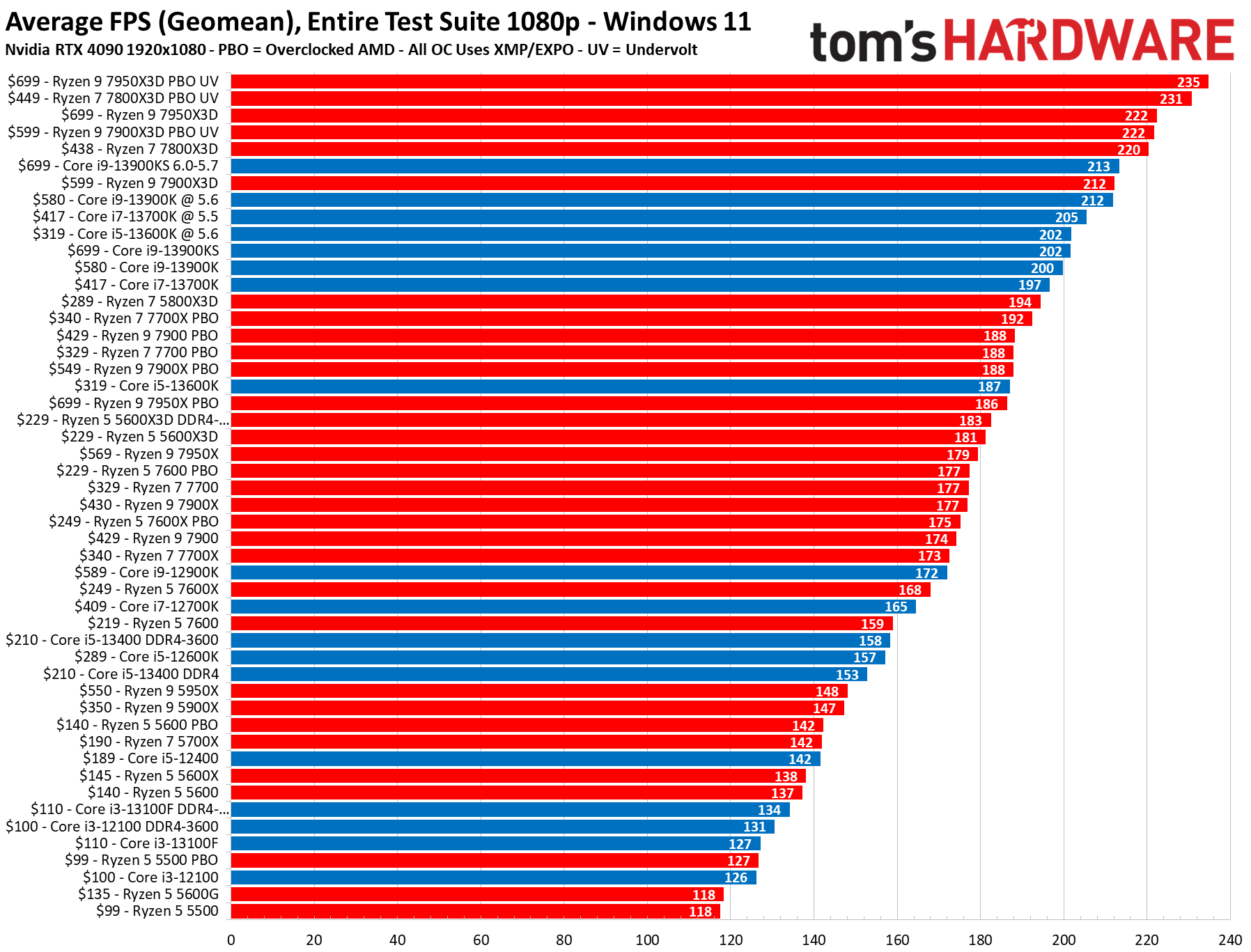
A: AMD's X3D CPUs, with their innovative 3D V-Cache technology, continue to be exceptionally strong contenders for pure gaming performance in 2026. Their large L3 cache significantly boosts framerates in many titles, making them a top choice for gamers prioritizing peak in-game performance. While Intel's latest offerings are very competitive, especially in clock speed, X3D models often maintain an edge in specific gaming benchmarks, particularly for specific genres.
Q: How important is single-core performance compared to multi-core for modern games?
A: For modern games, single-core performance remains highly important, especially for the primary game thread that dictates overall framerate. High single-core clock speeds and IPC (Instructions Per Cycle) ensure that game logic and immediate tasks are processed quickly. While multi-core performance is increasingly utilized for background tasks, AI, and physics, strong single-core speed often translates directly to higher and more consistent framerates in a wider range of titles.
Hey fellow gamers! If you are like most of us, gaming is that perfect escape valve after a long day of work, family commitments, or just navigating the daily grind. We want to dive into new worlds, connect with friends, or simply unwind with our favorite titles. But let's be real, nothing sours that experience faster than a stuttering framerate or a game that simply refuses to load properly. The culprit? Often, it's the brain of your gaming rig your Central Processing Unit, or CPU.
Choosing the right CPU can feel like navigating a maze of technical jargon. Core counts, clock speeds, cache sizes, benchmarks it is enough to make anyone's head spin. For those of us balancing a job and life, we do not have hours to pore over every single spec sheet. We need clear, actionable advice to make smart upgrade decisions that deliver maximum gaming fun without breaking the bank or our precious free time. This guide is designed exactly for you, the everyday gamer who values performance, efficiency, and getting the most bang for their buck. By 2026, the US gaming landscape continues to thrive, with an estimated 87% of gamers playing regularly and many dedicating over 10 hours a week. Social gaming through platforms like Discord and cross-play experiences are at an all-time high, making smooth, reliable performance more crucial than ever. So, let's cut through the noise and figure out how to compare CPUs for gaming like a pro.
What Exactly Does a CPU Do for Gaming?
Think of your CPU as the general manager of your entire computer system. While your Graphics Processing Unit (GPU) renders all those beautiful pixels on your screen, the CPU handles everything else. This includes processing game logic, managing artificial intelligence for non-player characters, handling physics calculations, managing your operating system, running background applications like Discord or your web browser, and even preparing the data that your GPU needs to render frames. A powerful gaming CPU ensures that all these tasks happen swiftly and efficiently, preventing bottlenecks that could limit your graphics card's potential. It is about more than just framerates; a strong CPU provides consistent frame times, leading to a much smoother and more responsive gaming experience.
Why Can't I Just Buy the Most Expensive CPU? (Value for Money)
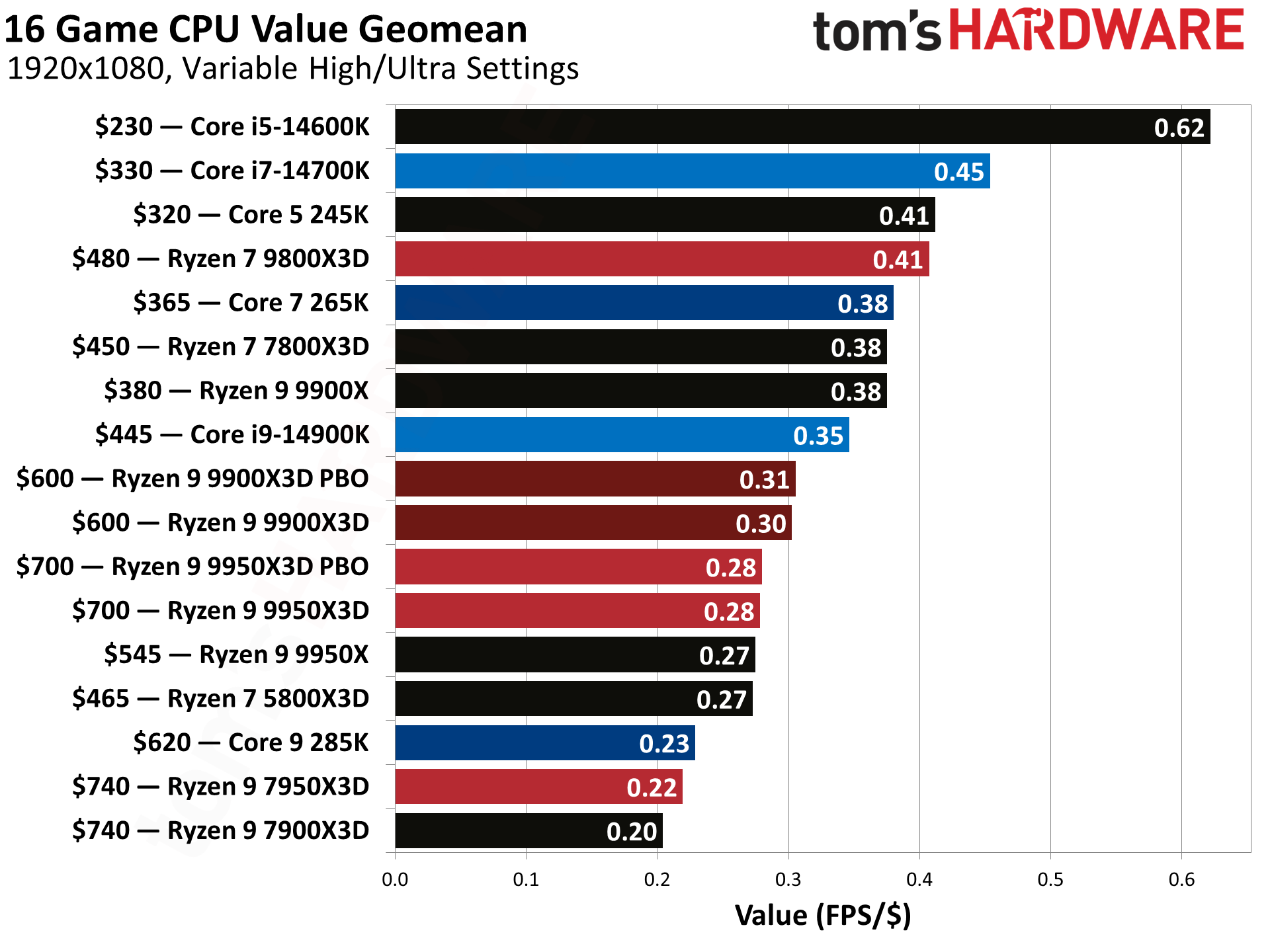
It is a common misconception that more money equals infinitely better performance, especially in gaming. While top-tier CPUs offer incredible power, gaming performance often hits a point of diminishing returns. Investing thousands in a CPU when a mid-range option provides nearly identical framerates in most games means that extra money could have been better spent on a higher-tier GPU, faster RAM, or even more games. For the average gamer balancing a budget, the sweet spot often lies in a processor that offers excellent performance per dollar. You want a CPU that keeps pace with your GPU without creating a significant bottleneck, allowing both components to shine. Trends this month show a continued focus on budget-friendly yet powerful builds, reflecting the reality that most gamers need value without compromising too much on the experience.
How Do Core Count and Clock Speed Impact My Games?
Core count refers to the number of individual processing units within your CPU, while clock speed (measured in GHz) indicates how many cycles per second each core can perform. Historically, gaming relied heavily on high clock speeds and fewer, stronger cores. Modern games, however, are increasingly designed to utilize multiple cores. For instance, open-world titles, strategy games, and any game with complex physics or AI will benefit from more cores. However, most games still prioritize a high single-core clock speed for their primary game thread. So, a CPU with a good balance of both, like 6 to 8 strong cores with a high boost clock speed (4.5 GHz or more), is often ideal for current and upcoming titles. More cores also become beneficial if you're streaming, recording gameplay, or running multiple demanding applications alongside your game.
What Role Does CPU Cache Play in Gaming Performance?
CPU cache is a small, ultra-fast memory built directly into the processor. It stores frequently accessed data, allowing the CPU to retrieve it much faster than from main system RAM. There are typically multiple levels: L1 (fastest, smallest), L2, and L3 (slowest, largest). For gaming, a larger and faster L3 cache can significantly improve performance by reducing the latency when the CPU needs data. This is particularly true in games that frequently access the same data, like large open-world environments or complex simulations. AMD's recent X3D processors, for example, have seen remarkable gaming gains due to their large L3 cache stacks, demonstrating just how impactful this often-overlooked spec can be. It helps the CPU feed data to the GPU more efficiently, leading to smoother framerates and reduced micro-stutters.
Are Integrated Graphics Good Enough for Casual Gaming?
Integrated graphics, often found in non-F Intel CPUs or AMD's 'G' series APUs, are graphics processing units built directly into the CPU. For serious gaming, a dedicated graphics card is almost always necessary. However, for casual gaming, older esports titles like League of Legends or Valorant, or less graphically demanding indie games, modern integrated graphics are surprisingly capable. AMD's Ryzen APUs, especially the ones with powerful Radeon Graphics, can even handle some newer titles at lower settings or resolutions. This is a fantastic option for gamers on a tight budget who might plan to add a dedicated GPU later, or for those who primarily play mobile games and want a PC for lighter desktop gaming tasks. For many, the ability to play older favorites or social games with friends without needing an expensive GPU right away offers incredible value.
How Do Benchmarks and Real World Tests Help Me Compare CPUs?
CPU specifications alone do not tell the whole story. Benchmarks and real-world gaming tests are your best friends when comparing processors. Benchmarks are standardized tests that measure a CPU's performance in specific tasks, providing objective numbers you can compare. Look for:
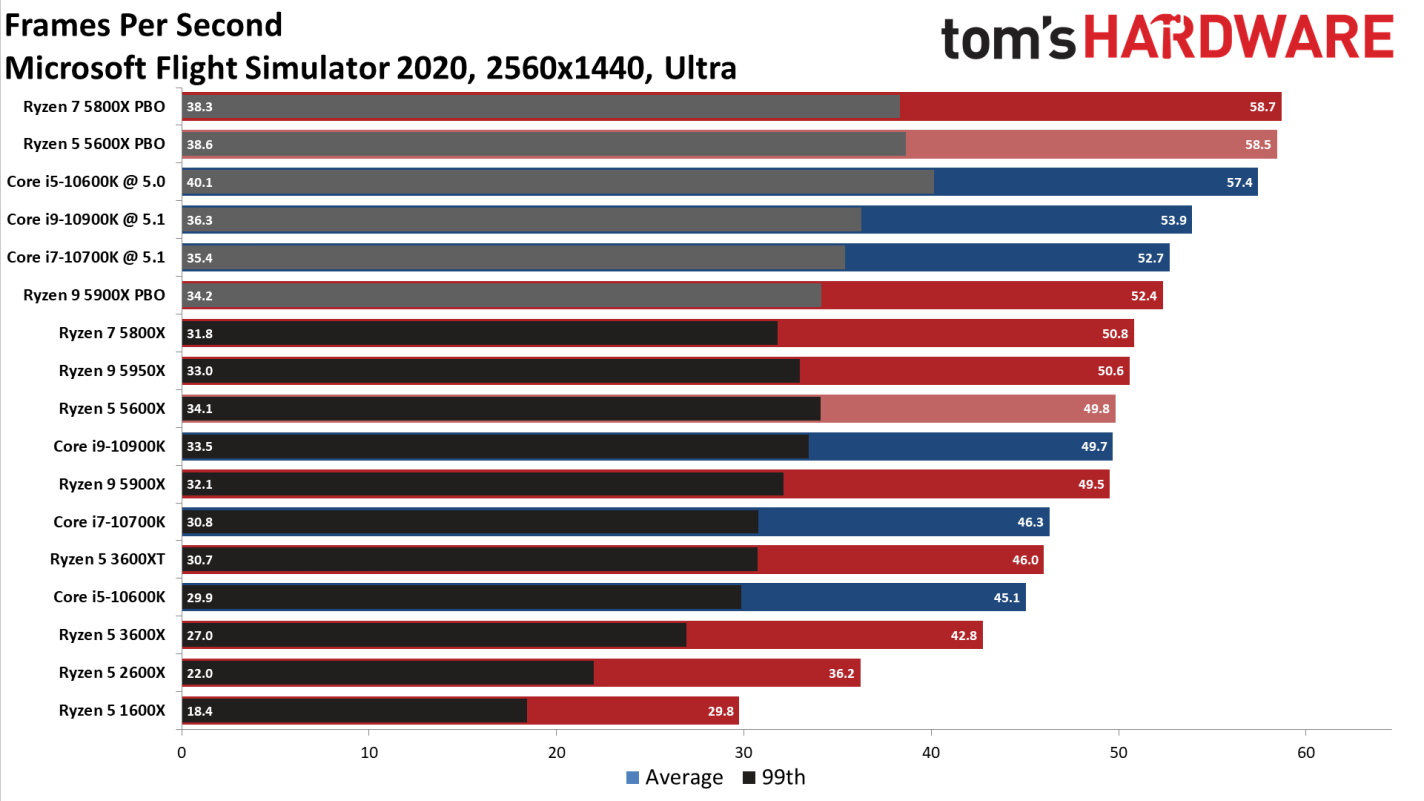
- Gaming Benchmarks: These show actual framerates in popular titles at various resolutions and settings. Pay attention to average FPS and 1% low FPS (which indicates stuttering).
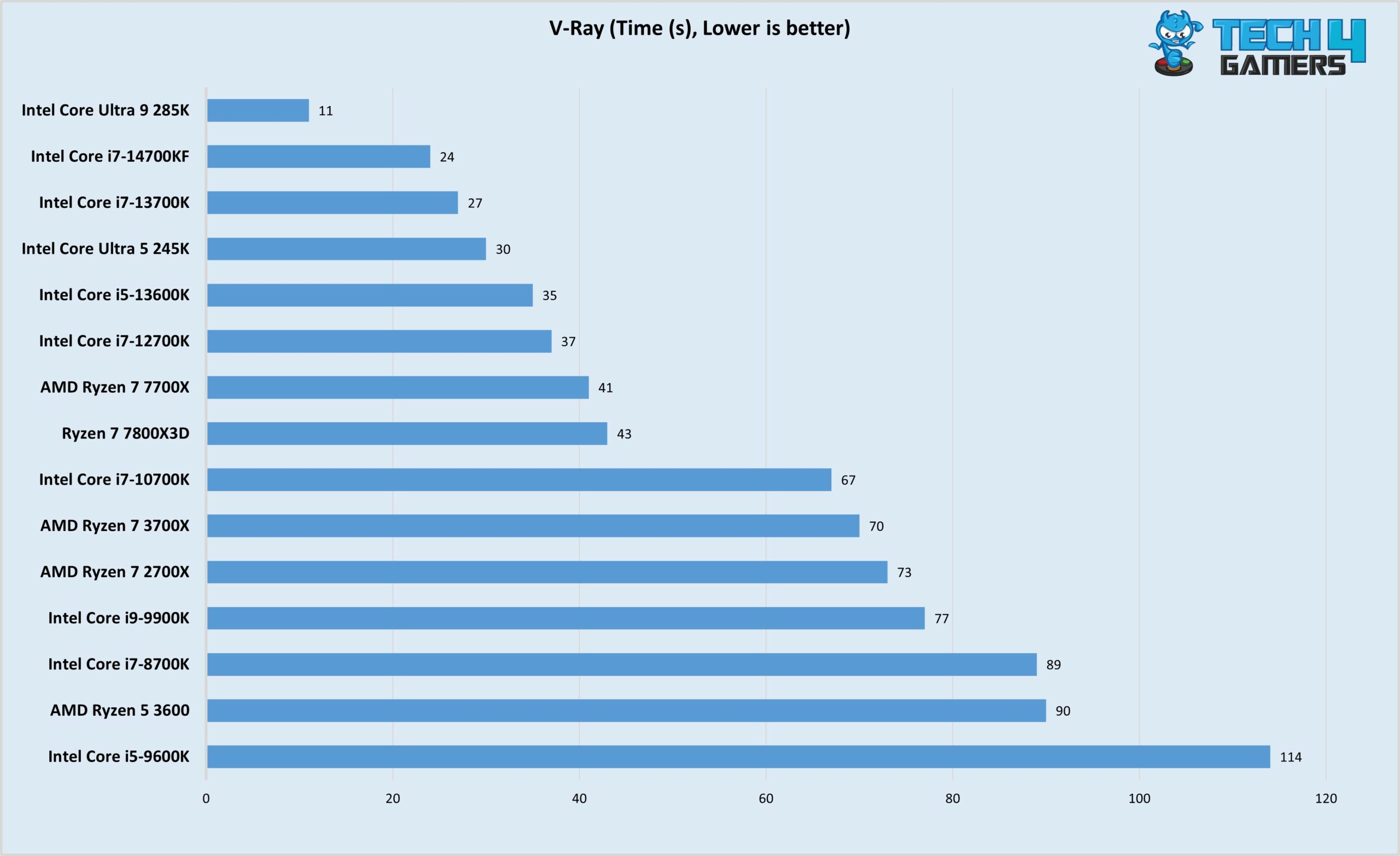
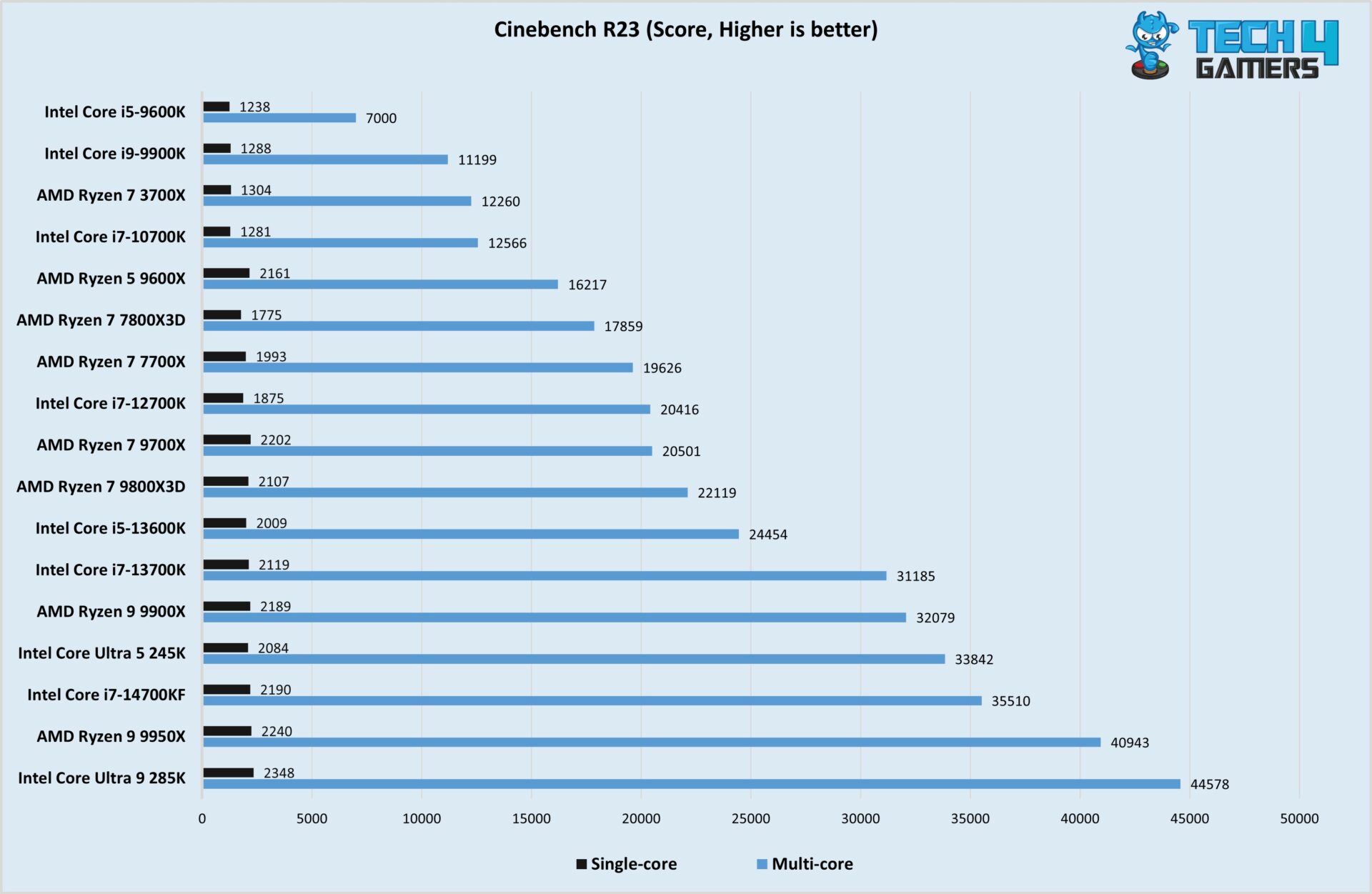
- Synthetic Benchmarks: Tools like Cinebench or Geekbench test raw computational power, useful for understanding multi-core and single-core performance.
- Application Benchmarks: If you also do video editing, streaming, or 3D rendering, benchmarks in those applications are crucial.
Intel vs AMD: Which Brand is Better for Gaming Right Now?
The rivalry between Intel and AMD has been a boon for gamers, driving innovation and competitive pricing. For years, Intel held the single-core performance crown, making them the go-to for pure gaming. AMD, with its Ryzen chips, revolutionized multi-core performance, making them excellent for tasks like content creation and streaming. As of 2026, the landscape is more balanced and exciting than ever. Both companies offer extremely competitive processors.
- Intel: Often excels in raw clock speed and single-core performance, which can give them an edge in some heavily CPU-bound games. Their recent generations continue to push high framerates.
- AMD: Their 3D V-Cache (X3D) processors continue to be gaming powerhouses, thanks to their massive L3 cache, often outperforming Intel in gaming-specific scenarios, especially in certain titles. They also generally offer excellent efficiency.
How Do I Future Proof My CPU Purchase on a Budget?
Future-proofing on a budget is about making smart, informed decisions that extend the useful life of your PC without overspending today. Here are some tips:
- Choose a Platform with Longevity: Look for CPUs on newer sockets (e.g., AMD's AM5 or Intel's LGA1700 as of recent generations) that are expected to support future CPU upgrades without requiring a new motherboard. This saves money down the line.
- Opt for a Balanced System: Do not put all your budget into the CPU and neglect the GPU or RAM. A balanced system with a decent CPU, capable GPU, and 16GB (or ideally 32GB for 2026 standards) of fast RAM will perform better overall.
- Consider Core Count for Multi-tasking: Even if current games don't fully utilize 8 cores, future titles and background applications will. An 8-core CPU offers a good balance for longevity.
- Buy Slightly Above Your Minimum Needs: Instead of buying the absolute minimum CPU for your current games, aim one tier higher if your budget allows. This provides a buffer for future game requirements.
- Monitor Sales: Keep an eye out for sales and bundle deals. Sometimes last generation's top-tier CPU can be a fantastic value purchase for current gaming needs.
Conclusion
Navigating the world of CPUs for gaming can be daunting, but with a clear understanding of what truly matters to your gameplay, it becomes much simpler. You are not just buying a chip; you are investing in countless hours of relaxation, skill-building, social interaction, and pure fun. By focusing on metrics like effective core count, strong clock speeds, sufficient cache, and understanding how to interpret real-world benchmarks, you can confidently choose a processor that supports your gaming habits without unnecessary expense or wasted time. Remember, the best CPU for you is the one that fits your budget, maximizes your current GPU, and provides the smooth, responsive experience you deserve. What's your biggest gaming challenge when upgrading hardware? Comment below and let's tackle it together!
FAQ Section
Is a dedicated cooler necessary for a gaming CPU?
Yes, for most gaming CPUs, especially higher-performance models, a dedicated aftermarket cooler is highly recommended. The stock coolers provided with some CPUs are often sufficient for basic use but will struggle under gaming loads, leading to higher temperatures and potentially reduced performance (thermal throttling). Investing in a good air cooler or an All-in-One (AIO) liquid cooler ensures stable temperatures and optimal boost clocks.
How important is PCIe version for my gaming CPU?
The PCIe version (e.g., PCIe 4.0 vs 5.0) of your CPU and motherboard determines the bandwidth available for your graphics card and NVMe SSDs. While PCIe 5.0 is the latest, for most current gaming GPUs, PCIe 4.0 offers more than enough bandwidth. You will likely only see a noticeable difference with very high-end GPUs or ultra-fast NVMe drives. Focus on compatibility with your other components, but don't overspend solely for PCIe 5.0 if your other parts don't utilize it.
Can my CPU bottleneck my high-end GPU?
Absolutely. A CPU bottleneck occurs when your processor cannot feed data to your powerful GPU fast enough, causing the GPU to sit idle for periods and not perform at its full potential. This results in lower framerates than your GPU is capable of. Signs of a CPU bottleneck include high CPU utilization (near 100%) while GPU utilization is low (e.g., 60-70%), especially at lower resolutions or in CPU-intensive games. Balancing your CPU and GPU is key for optimal gaming performance.
Should I prioritize more cores or higher clock speed for competitive esports?
For competitive esports titles, which are often less graphically intensive but demand extremely high and consistent framerates, prioritizing higher single-core clock speed is generally more beneficial. Many esports games still rely heavily on one or two strong CPU cores. While some cores are good for background tasks, the ability of one core to process game logic quickly can make a bigger difference in achieving those ultra-high FPS numbers needed for a competitive edge.
What is hyper-threading or SMT and how does it help gaming?
Hyper-threading (Intel) or Simultaneous Multi-threading (SMT, AMD) allows a single physical CPU core to handle two independent instruction threads simultaneously. This makes a 6-core/12-thread CPU behave somewhat like a 12-core CPU in multi-threaded applications. For gaming, it can improve performance in titles that can utilize more threads, especially when background tasks are running. It is not as effective as true physical cores but does provide a valuable boost to overall system responsiveness and multi-tasking capabilities.
Understand CPU basics for gaming, crucial metrics like core counts and clock speeds, how to interpret benchmarks, Intel versus AMD considerations, the role of integrated graphics, effective budget planning, and future proofing your CPU purchase for long term value.
35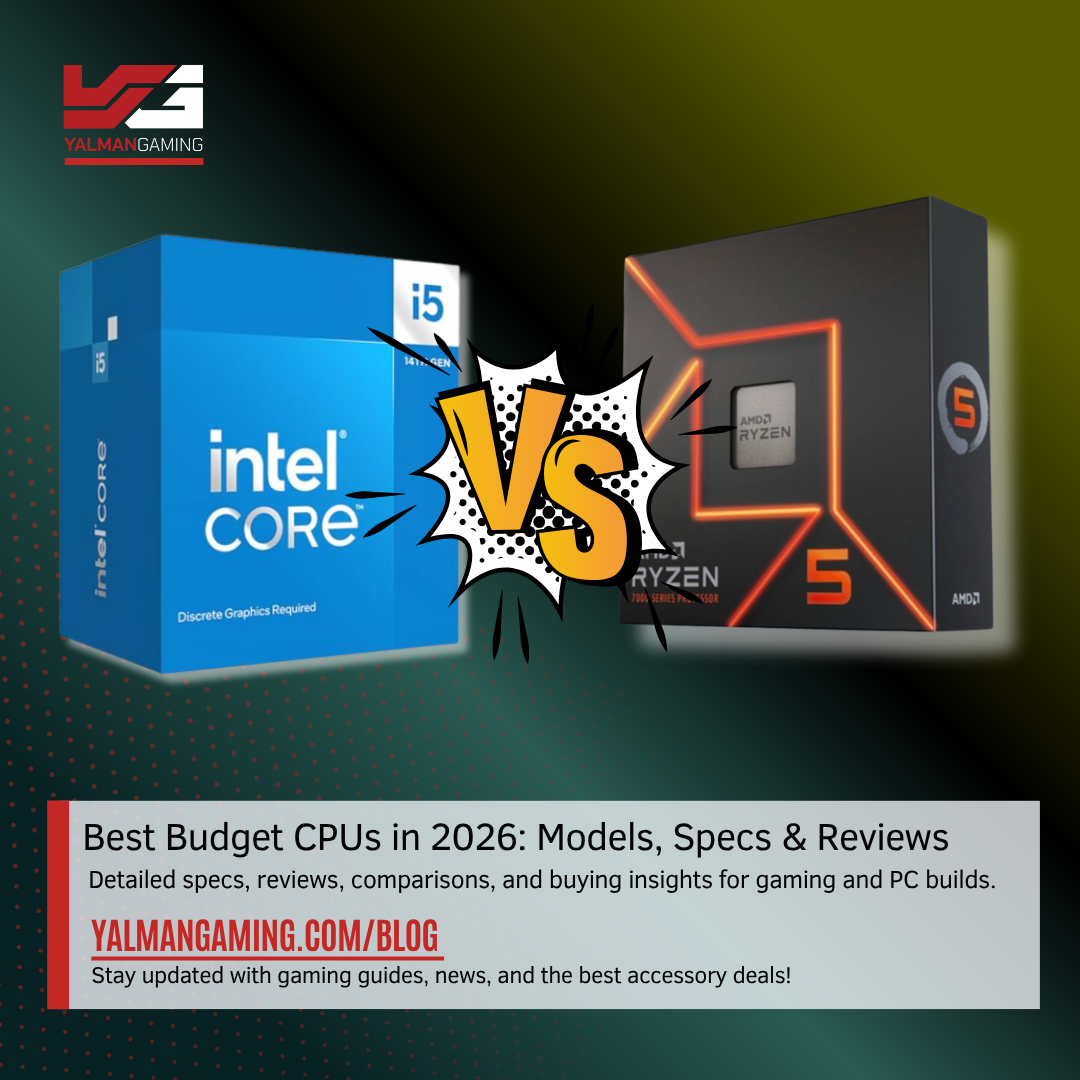

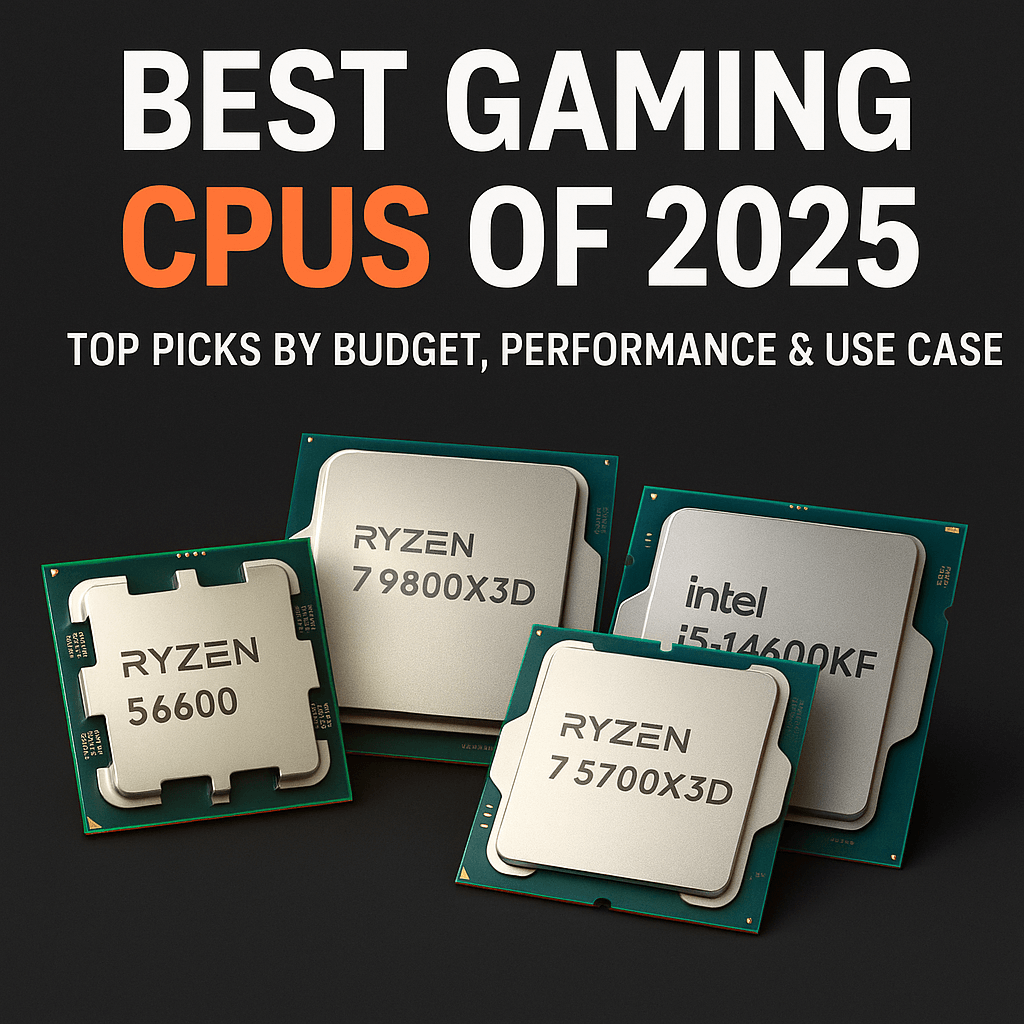
Best Budget CPUs 2026 In Pakistan Top Picks For Gaming Pakistan Best Budget CPUs In 2026 . Best CPUs For Gaming And In 2026 Top Picks For Best Cpu For Gaming And . Top Gaming CPUs To Consider For 2026 LevelUpTalk Top Gaming Cpus 2026 12 30 2025 50bb6ab6 B8b2 46f4 87e4. Best CPU For Gaming 2026 Top Gaming Processor The Best CPU For Gaming In 2026 01 . Best Gaming CPUs Of 2026 Top Picks By Budget Performance Use Case



Grab This Awesome 4K Ready Gaming PC With A 7800X3D And RX 9070 XT For . 12 Best Gaming CPUs July 2026 Complete Guide Best Gaming CPUs . AMD Gained Consumer Desktop And Laptop CPU Market Share In 2024 Server . Intel Core I5 Vs Ryzen 5 Best Laptop Choice For UK Buyers In 2026 Intel Vs AMD CPUs The 2026 Desktop Showdown . Best Gaming CPU 2026 GMDegens Io Best Gaming Cpu

Die Besten Gaming CPUs 2026 F R Jedes Budget Blog Beste CPUs 2026 768x432 . Best CPU GPU Combos For Gaming PC Builds In 2026 ALL BUDGETS . 12 Best CPU For Gaming March 2026 Processors Tested Ranked Featured Image Q3q6lajs . TESTED Best CPU For Gaming In 2026 YouTube . Best Gaming Processor 2026 AMD Vs Intel Comparison Complete Guide Cpu Gaming Intel


15 Best AMD Ryzen CPUs For Gaming June 2026 Guide Best AMD Ryzen CPUs For Gaming 768x419 . The 7 Best Budget CPUs For 2026 Tested And Reviewed The 7 Best Budget CPUs For 2026 Tested And Reviewed . The Best Gaming CPUs Available In 2026 Best Gaming CPUs UK Blog Feature Image Bottom Text Blog TextTwitter . Best Gaming Intel CPU 2026 8 Models Tested Compared Intel CPU 1024x559 . Best Gaming CPUs 2026 10 Processors For Every Budget From Budget Word Image 5


Best Budget CPUs In 2026 With Gaming Benchmarks Intel Core Ultra 5 245K V Ray Test Image By Tech4Gamers Scaled . Best Budget CPUs In 2026 With Gaming Benchmarks Intel Core Ultra 5 245K Cinebench R23 Test Image By Tech4Gamers 1920x1251 . Best Desktop CPUs 2026 Gaming Vs Guide 5 1024x553 . Best CPUs Of 2024 Intel Vs AMD Gaming Production Budget Vlcsnap 2024 11 21 .webp. Best CPUs For Gaming 2026 Expert Reviews Performance Test Best CPUs For Gaming



Best CPU For Gaming And 2026 Expert Reviews Featured Image N479qly . Ryzen 9000 CPU Gaming Performance Has Come A Long Way Since Launch 7 Samsung TV Remote Codes Featured Image 29 . Best CPUs Of 2024 Intel Vs AMD Gaming Production Budget Vlcsnap 2024 11 21 .webp. 10 Best CPUs For Emulation And Retro Gaming July 2026 Expert Reviews Best CPUs For Emulation And Retro Gaming . Best Budget Gaming CPU 2026 Top Picks Under 200 Switchblade Gaming Best Budget Gaming Cpu 2026.webp


Best Gaming CPU 2026 Ryzen 7 9800X3D Vs 9600X Vs Intel Best Gaming Cpu 2026 768x432 . Best Budget Intel CPU For Gaming 2026 Reviews Benchmarks Featured Image Eu184su9 . Best CPU For Gaming Budget 2026 Top 10 Budget Gaming Processors Best CPU For Gaming Budget . Best Gaming Intel CPU 2026 8 Models Tested Compared Featured Image T5c 8utg . Best Budget Gaming GPU 2026 Top Picks Under 200 Switchblade Gaming Best Budget Gaming Gpu 2026 Intext Budget Gpu